ChatGPT Business Hub is where a business claims its profile in ChatGPT, keeps the details current and sees how often ChatGPT mentions it. OpenAI opened it in beta on 10 November 2026, aimed at the 1.2 billion people it says use ChatGPT every week. If you’ve ever managed a Google Business Profile, the idea will be familiar: you prove the business is yours, then you look after what ChatGPT shows about it.
This guide starts with whether you can claim at all and ends with a verified, published profile, with a section on what to do when a step fails. It’s based on OpenAI’s help center, announcement and terms as they read on 24 November 2026, press coverage of the launch, and the problems users have posted on OpenAI’s community forum. The beta changes often, so keep OpenAI’s setup guide open as you go.
Check whether your business can claim yet
Three things decide it: where the business is, what kind of business it is, and whether OpenAI can verify it in that country. OpenAI publishes no country list.
Online businesses with a website come first. Since 19 November, OpenAI’s announcement says e-commerce and online service businesses based outside the US can claim their business and publish an agent. If your online business doesn’t come up when you search for it in Business Hub, you may be offered the option to add it.
Local stores and restaurants are the exception: for now they can only claim a listing that already exists in the US. A café in Lisbon or a shop in Porto has nothing to claim yet. The limit doesn’t name service businesses, and our own agency, with an office near Lisbon, is claimed and verified (you’ll see its profile after step 5). OpenAI told SmartCompany, an Australian business publication, that wider availability is on its way. It gave no date.
Expect a wait even if you qualify on paper. One UK agency tried to claim as an online business on launch day and was told ChatGPT would email when it could continue, and it was still waiting the next day. In Australia, the founder of an AI company told SmartCompany that around 15 of the firm’s clients, all law, accounting and pest-control businesses, had been put on a waitlist, while the founder’s own online business went through.
Some sectors may be turned away. OpenAI’s policy for businesses in ChatGPT says not every business can claim a profile. It may decline businesses whose offerings raise safety or integrity concerns and hold back other categories for now. It doesn’t say which ones.
Claiming costs nothing at the moment. Digiday reported at launch that Business Hub and business agents are free for now, and that OpenAI didn’t rule out charging later. OpenAI’s own pages don’t mention a price.
Before you start: what to have ready
The claim form is short; the UK agency above timed it at about ten minutes before the wait began. Most problems come later, when the details you typed don’t match your records. So gather these first:
- the ChatGPT account that will own the profile;
- access to one verification channel, which can be the business phone, the business email address, the website’s DNS settings or the Shopify admin;
- a current government-issued ID for the person claiming;
- the business’s registration details, meaning its legal name, registered address and registration or tax number (in Portugal, the company’s NIPC; in the UK, its Companies House number);
- proof that you’re authorized to represent the business, if you aren’t its registered owner.
Decide three things that are hard to undo
The first is which account to use. Users on OpenAI’s forum report there’s no way to move a profile to another account, and OpenAI’s guide tells you to claim with the account you’ll manage it from. Use an account that belongs to the business, opened with a company email address, rather than an employee’s personal account.
The second is the name. Enter the legal name exactly as it appears on your registration documents, and put the trading name in the DBA (“doing business as”) field. If your online store trades as “Casa Azul” but the company is registered as “Azul Comércio, Lda.”, the registered name goes in the legal-name field. The address and the registration or tax number must match your official records as well.
The third is the business type and country. A user who picked “sole proprietorship” by mistake couldn’t change it after the identity check, and OpenAI’s support team told them to open a support case. An Australian user says the form asked for a US registration number, with no way to change the country. Several UK sole traders say the form demanded a VAT number they didn’t have.
Read the terms before you accept
OpenAI’s Businesses in ChatGPT Terms, last updated on 18 November, are worth ten minutes of your time, or your lawyer’s if the business is large. This isn’t legal advice, but four points stand out:
- OpenAI may create and show a listing for your business whether or not you claim it, and it may add to, edit or replace that information, or decline to show what you submit;
- the license you give OpenAI to display your basic business information is perpetual and irrevocable, and it extends to your business names, trademarks and other brand assets;
- you’re solely responsible for the information you provide and for your business agent’s answers, and you release OpenAI from claims arising from your agent;
- OpenAI’s assistant may phone your business on behalf of ChatGPT users (the terms include a link to opt out).
OpenAI revised the terms on 18 November after lawyers questioned an earlier, broader version, Digiday reported.
How to claim your business on ChatGPT, step by step
Step 1: find your business in Business Hub
Sign in to ChatGPT and open Business Hub from the sidebar, or go to chatgpt.com/business-hub. Search for the business by name, select the matching listing and confirm the account that will manage it. If you see “Contact support” where you expected to start, the listing is locked; if someone else has already claimed it, there’s a dispute route (both are covered under troubleshooting below).
Step 2: prove you’re connected to the business
Business Hub offers up to four methods, and which ones appear depends on the listing:
- a code sent to the business phone, by text message or automated call;
- a code sent to the business email address;
- a TXT record added to the website domain’s DNS;
- a connection to your Shopify store, through the ChatGPT app in your Shopify admin or the “Connect Shopify” button in Business Hub.
If the phone number or email on the listing isn’t one you can reach, use the domain. Copy the record’s type, host and value exactly as shown, and if a developer or hosting company manages your DNS, ask them to add it for you. Then check that the record is live with a DNS lookup tool before you click “Verify domain”. Some users say the check gave up while they waited for the record to appear. Add it only when you’re ready to finish.
Step 3: wait for OpenAI’s review
OpenAI reviews every claim and emails you its decision, or a request for more information. It gives no timeframe. Watch the inbox of the email address on the ChatGPT account, including the spam folder. You can cancel the claim while it’s under review, but don’t start a second claim for the same business while you wait.
Step 4: verify your identity with Persona
Once the claim is approved, you complete an identity check with Persona, the verification company OpenAI uses. You can put it off. Most of Business Hub stays shut until Persona approves you, though: no publishing changes, no insights, no product feed and no business agent. Persona’s approval is also what publishes the profile and adds the blue verified check.
Persona may ask for your government-issued ID, your business registration information and proof that you can represent the business, and possibly a selfie. Its help center explains what fixes most rejected photos:
- photograph a current physical document (not a photocopy or a temporary paper license) in bright, even light, with all four edges in the frame;
- for the selfie, don’t sit with a window or lamp behind you, and take off hats and sunglasses;
- type every detail the way it appears on the document and on your official records.
Persona checks what you type against those records, so a missing “Lda.” or an old address can be enough to fail.
Step 5: complete and publish the profile
Add or correct the website, description, product or service category, logo and cover photo. Online shops can also add their delivery and return policies and connect a product feed, as a CSV file or a hosted feed URL, with current prices and availability. OpenAI reviews changes before it publishes them, and they can take a while to show in ChatGPT’s answers.
Write the description for a customer: what you sell or do, where, and for whom, in plain sentences. OpenAI’s policy asks for accurate, current information and content that suits a broad audience, and it bans invented reviews, guarantees you can’t back up and hidden fees. Check the business name letter by letter before you finish. One user found a typo in a verified profile’s name and no field to correct it.
Treat a published profile as permanent. OpenAI Support can’t delete, unpublish or hide one, and only unpublished drafts can be deleted.
What a verified profile looks like
Ours is live. UniK SEO is a marketing agency with an office in Algés, on the edge of Lisbon, and its profile in ChatGPT carries the blue verified check. The card opens with a strip of photos of our office. Below the name come the category, three buttons (Get directions, View website and Call) and our address, phone number, opening hours and email address.
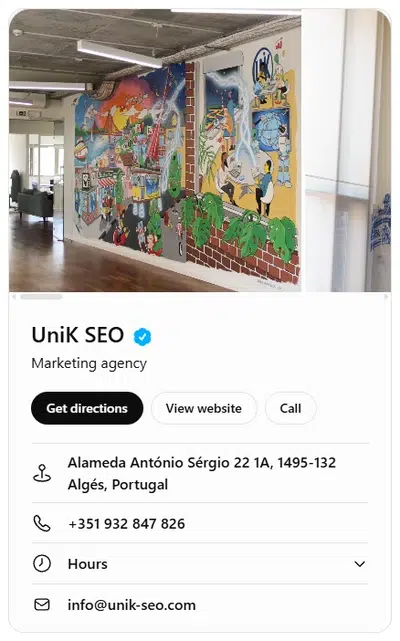
Two details are worth copying. The category is one of the fields Business Hub lets you change, so make sure yours describes what you actually do. And the limit on local listings outside the US names stores and restaurants: an office-based service business in Portugal, like ours, can be claimed and verified, although some service firms elsewhere are still waitlisted.
After approval
Read your insights
Business Hub shows aggregate activity for the past 28 days: mentions, website clicks and discovery topics, which are the themes of the conversations where ChatGPT mentioned or cited you. Figures only appear above a minimum volume, so a blank metric doesn’t necessarily mean zero. You never see individual prompts or conversations.
Mentions are counted narrowly. For an online business, a mention counts only when ChatGPT references your website, and your brand name on its own doesn’t count. So when ChatGPT recommends you by name without linking to your site, Business Hub doesn’t record it. For a local business, any answer that shows the location counts, even if nobody opens it. Website clicks are clicks on links in ChatGPT, not visits or purchases, so your analytics will probably show fewer ChatGPT sessions than Business Hub shows clicks.
What the panel can’t tell you is which questions you’re missing from, or how you compare with competitors. For that, run the questions your customers ask and read the answers yourself. Our guide on how to audit brand visibility on LLMs shows how. Our list of AI visibility tools for agencies covers the tools that track it over time, and our article on how LLM referrals convert compared with organic search explains what to expect from the visitors.
Give your team or agency access
The admin who claimed the business can add teammates and give an agency access to manage the profile or its agent. Each person signs in with their own ChatGPT account, and a personal claim invitation shouldn’t be forwarded to someone else. If you work with an agency, keep the claim on the business’s account and add the agency to it, so your access never depends on a supplier.
Groups get no parent profile that manages every brand or claims its locations. Each brand has its own profile, location profiles stay locked by default under OpenAI’s managed claims, and the route to them is your OpenAI account contact.
Decide whether you want a business agent
A business agent is an optional chat on your profile. Customers ask it about your products and policies, and it answers from the information you provide. E-commerce and online service businesses with a website can publish one, inside and outside the US, if they meet OpenAI’s Business Agents Policy. A verified profile alone doesn’t make you eligible, and you can’t create an agent while Persona is pending or after it has failed. What it can’t do is take orders or bookings, or check an order’s status. It sends customers to your website for those. Businesses can also pay to promote it as a ChatGPT ad, which OpenAI labels as sponsored and keeps apart from its answers.
Make sure ChatGPT can read your website
Because a mention of an online business means ChatGPT referenced its website, OpenAI’s crawler has to reach your site. OpenAI’s search crawler is called OAI-SearchBot. According to OpenAI’s crawler documentation, sites that block it in robots.txt aren’t shown in ChatGPT’s search answers, although they can still appear as plain navigational links. GPTBot is a separate crawler that collects content for training, so blocking it doesn’t take you out of ChatGPT search. Robots.txt changes take about 24 hours to reach OpenAI’s search systems.
A firewall or bot protection service can turn these crawlers away even when robots.txt lets them in. Our free SEO audit checks both. It also looks for Organization schema and for text that loads without JavaScript, two things that help AI assistants work out who you are. See also how to make your website LLM-friendly and how schema markup helps search and AI.
What claiming won’t do
Claiming lets you manage the information you give ChatGPT, but in OpenAI’s words it “doesn’t guarantee increased visibility”, and it gives you no direct control over ChatGPT’s independent recommendations. Advertising doesn’t change those answers either. ChatGPT also draws on other sources when it answers questions about a business, so what reviews, directories and the press say about you still shapes the answer. One UK company that verified and published its profile found ChatGPT’s answer card still showing another company’s logo, taken from the web.
The profile is one input. The rest is the work that gets a brand into AI answers in general: a website ChatGPT can read, the same business details everywhere they appear, and pages that answer what customers ask. We explain how these fit together in what AIO, GEO and AEO mean for your business.
Troubleshooting: when a step fails
Most fixes end with OpenAI Support. When you contact OpenAI Support, include the step you were on, the exact error message and a screenshot with personal details removed. Don’t post ID or registration numbers on the public community forum. OpenAI’s own support team has asked users not to.
Your business doesn’t appear in search
Search for both the legal name and the trading name; if it’s an eligible online business and neither turns up, you may be offered the option to add it yourself. A local shop or restaurant outside the US can’t be claimed yet.
The listing is locked or already claimed
“Contact support” on a listing means it’s locked: select it to ask for access. If someone else has claimed your business, open the profile, choose the ••• menu and then “Dispute ownership”, and verify with Persona that you represent the business. If you started a claim earlier and can’t find it, sign in with the same ChatGPT account you used then. A personal claim invitation only works with the exact email address it was sent to.
You’re on a waitlist
There’s nothing to fix: ChatGPT emails you when you can continue. OpenAI gives no dates. Keep the email address on the ChatGPT account monitored, and use the time to get your website and registration details in order.
The verification code doesn’t arrive
Check which other methods the listing offers. If the phone option has both text and call, try the other one, and if the phone number or email on the listing is out of date, verify through the website domain instead.
The DNS check fails
Compare the record in your DNS with the one Business Hub shows, character by character: type, host and value. If someone else manages the domain, confirm they added it to the right domain and not a staging copy, then wait until a DNS lookup shows the record before you select “Verify domain” again.
Shopify verification shows an error
Two retailers, one in Spain and one in the US, reported an “http_error” during Shopify verification, along with pending claims they couldn’t cancel. On one thread, OpenAI Support replied that an agent would follow up. If it happens to you, open a support case. Meanwhile, try another method.
OpenAI rejects the claim or asks for more information
Read the email first: it says what OpenAI needs. Reply to that request instead of starting a new claim, because OpenAI asks you to let a review finish before you try again.
Persona declined you and there’s no “Try again”
It’s the complaint we saw most often on OpenAI’s forum, from users in Brazil, Ukraine, India, Indonesia and the US, several of whom got a decline within minutes and no reason. Persona can’t tell you why or reverse it: its help center says only the company that asked for the check sees the reason and decides what happens next, and here that company is OpenAI. If a “Try again” button appears, correct the details so they match your official records and resubmit. If it doesn’t, contact OpenAI Support. Deleting the draft and starting over doesn’t guarantee another attempt.
Persona says “too many attempts”
Stop retrying. Persona says reopening the link or starting in a new tab doesn’t reset the count, and the limit is set by the company running the check. Ask OpenAI Support for a new verification link.
You chose the wrong business type or country
Users report there’s no setting to change either after the identity check. Open a support case with the type or country you chose and the one you meant to choose, as OpenAI’s support team advised a user in that position.
Insights stay blank
Activity may be under the reporting threshold, or the data may still be coming in, which is most likely in the first days and for businesses with little activity. If a metric stays blank, contact OpenAI Support.
Your changes don’t show, or ChatGPT shows the wrong details
OpenAI reviews changes before it publishes them, and answers can take time to catch up. ChatGPT also uses other sources, so fix wrong details at their source too: your website, your Google Business Profile and the directories that list you.
You want to delete the profile
You can delete an unpublished draft. A published profile can’t be deleted, unpublished or hidden, even by OpenAI Support, and some users say the “Delete draft” option disappeared once they clicked “Verify”.
How it compares with a Google Business Profile
The idea is the same: you claim a listing, prove it’s yours and keep it current. The details differ:
| Google Business Profile | ChatGPT Business Hub | |
|---|---|---|
| Where it shows | Google Search and Maps | ChatGPT answers |
| Local shops and restaurants | Can claim in most countries | Existing U.S. listings only, for now |
| What you manage | Hours, photos, posts, products and services, review replies | Website, description, category, logo, cover photo, delivery and return policies, product feed |
| What a customer sees | Photos, category, address, hours, phone, reviews, buttons for directions, website and calls | On our own profile: photos, category, address, phone, hours, email, buttons for directions, website and calls |
| What you measure | Searches, views, calls, direction requests, website clicks | Mentions, website clicks and discovery topics over 28 days |
| Reviews | Customers review you on the profile | Not part of Business Hub in OpenAI’s documentation |
If customers find you through local search, your Google Business Profile still comes first. Our local SEO services cover that side.
Where to start
If your business has a website and sells online or offers services, claim it now. Have access to the business phone, email, DNS or Shopify ready, and type your registration details exactly as they appear on your records. Run a local shop or restaurant outside the US? There’s nothing to claim yet. Spend the time on your website, your Google Business Profile and what other sites say about you.
If you’d rather have a team handle it, our GEO services cover how your brand appears in ChatGPT and other AI assistants, from your website to the mentions their answers are built on.
UniK SEO Team
Frequently asked questions
What is ChatGPT Business Hub?
It’s OpenAI’s tool for claiming a business in ChatGPT. After verification you manage the business’s website, description, category, logo and other details. You can also see how often ChatGPT mentioned the business and how many people clicked through to its website in the last 28 days.
Is ChatGPT Business Hub free?
Yes, for now. Digiday reported at launch that Business Hub and business agents are free and that OpenAI didn’t rule out charging later. Paying is optional: you can promote your business agent as a ChatGPT ad.
Can any business claim its profile on ChatGPT?
Not yet. You must own the business or be authorized to represent it, and availability depends on the country and the type of business. E-commerce and online service businesses with a website can claim outside the US too, though some are waitlisted. Local stores and restaurants can currently claim only existing U.S. listings.
How do I verify my business on ChatGPT?
Search for the business in Business Hub and confirm the connection: a code sent to the business phone or email, a DNS TXT record, or your Shopify store. Once OpenAI approves the claim by email, complete an identity check with Persona, which may ask for a government-issued ID and your business registration details.
How long does ChatGPT business verification take?
OpenAI doesn’t give a timeframe for its review or for the Persona check, and both vary. The claim form itself took one UK agency about ten minutes. Some businesses outside the US have been put on a waitlist before they could continue.
Why did my Persona verification fail?
Persona’s help center lists the common causes: a blurry or cropped photo of the ID, an expired or temporary document, or business details that don’t match your official records. Persona can’t tell you the reason or reverse the decision. If no “Try again” button appears, contact OpenAI Support.
Does claiming my business make ChatGPT recommend it?
No. OpenAI says claiming doesn’t guarantee more visibility or give you control over ChatGPT’s independent recommendations, and advertising doesn’t influence its answers. What claiming gives you is control over the information you provide about the business.
What counts as a mention in Business Hub insights?
For an online business, ChatGPT has to reference your website. The brand name alone doesn’t count. For a local business, a mention counts whenever ChatGPT shows a result for that location, even if nobody opens it.
Can I delete my ChatGPT business profile?
Only while it’s an unpublished draft. OpenAI Support can’t delete, unpublish or hide a profile once it’s published, so check every detail before you finish verification.