Quick summary
- Chrome started warning about HTTP sites in April 2026, and from October 2026 (Chrome 154) that warning becomes active by default for all users.
- HTTPS has been a ranking signal since 2014, but today the biggest risk of not migrating isn’t losing positions — it’s losing trust and traffic because of browser warnings.
- A safe migration requires: an SSL/TLS certificate, 301 redirects without chains, updated internal and canonical links, a new sitemap, and HSTS only once everything is confirmed.
- You don’t need Search Console’s “Change of Address” tool for an HTTP → HTTPS migration on the same domain — Google treats it as a natural continuation of the site.
- Expect 1 to 4 weeks of minor traffic fluctuations while Google reprocesses the new URLs; this is normal and not a sign of a penalty.
If your site still runs on HTTP, 2026 is the year that stops being optional. Migrating to HTTPS isn’t just a security matter — it’s an essential step for SEO, for user trust, and now, for staying accessible without warnings in the world’s most-used browser.
The “S” in HTTPS stands for Secure: it ensures that all data transmitted between the browser and the server is encrypted and protected against interception. Google values secure sites, and HTTPS has been a ranking factor since 2014 — but the most urgent reason to migrate now has another name: Chrome’s HTTPS-First Mode.
Why HTTPS is (even more) urgent in 2026
In October 2025, Google announced the rollout schedule for HTTPS-First Mode in Chrome — a change that makes HTTPS the browser’s default behaviour:
- April 2026 (Chrome 147): the mode is enabled for over a billion users with Enhanced Safe Browsing turned on.
- October 2026 (Chrome 154): it becomes the default behaviour for all Chrome users.
In practice, Chrome now always tries the HTTPS connection first and shows a warning — which users can bypass, but which reduces trust and conversion — whenever a site still only responds over HTTP.
According to Google itself, the warning only appears for infrequently visited or unfamiliar sites (the median user sees fewer than one warning a week), but for an institutional or conversion-focused site, even an occasional warning means lost traffic and credibility.
This adds to an already familiar factor: Google has used HTTPS as a ranking signal since 2014, when it officially announced this on its webmaster blog.
It remains a lightweight signal — more of a “tie-breaker” between otherwise equivalent pages than a decisive factor — but in 2026 it stopped being purely a ranking question and became a question of access.
How HTTPS affects your site’s SEO
Adopting HTTPS offers a range of direct and indirect SEO benefits:
- Ranking signal: Google has confirmed HTTPS as a classification signal since 2014, favouring secure sites in search results.
- User trust: HTTPS sites don’t show “not secure” warnings, which reduces bounce rate and increases conversion.
- Protection against attacks: HTTPS prevents man-in-the-middle attacks, protecting form data, logins and payments.
- Access to modern technology: HTTP/2, HTTP/3 (QUIC), service workers, PWAs and browser APIs (geolocation, camera, push notifications) all require HTTPS to work.
- More reliable referral data: with HTTPS, referrer information is preserved between secure sites, making GA4 traffic-source data more accurate.
- Trust for AI answer engines: tools like ChatGPT, Perplexity and Gemini tend to prefer citing secure, verifiable sources — an increasingly relevant factor for anyone working on AI visibility (GEO/AEO), alongside traditional SEO.
Checklist: how to migrate from HTTP to HTTPS without losing rankings
To carry out an efficient, safe migration, follow these steps in order:
- Get an SSL/TLS certificate. This can be free with automatic renewal (Let’s Encrypt, via the ACME protocol) or issued by a paid certificate authority through your hosting provider. Favour TLS 1.3 support and avoid keeping TLS 1.0/1.1, which are now considered obsolete and insecure.
- Install the certificate on the server or CDN. If you’re using Cloudflare or similar, confirm the encryption mode is set to “Full” or “Full (strict)” — “Flexible” mode keeps the connection to the origin server on HTTP, which combined with a forced redirect on the server itself frequently causes the too-many-redirects error (ERR_TOO_MANY_REDIRECTS).
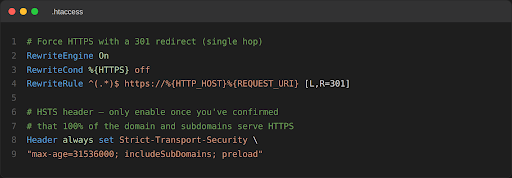
- Set up 301 redirects from every HTTP URL to its HTTPS equivalent, in a single hop (avoid redirect chains). For requests that need to preserve the method (e.g. POST forms), use 308 instead of 301.
- Update all internal URLs — menus, footer links, images, scripts and other assets — to point directly to HTTPS, rather than relying on the redirect.
- Update canonical tags to self-reference HTTPS, and confirm that hreflang pairs (if the site has multiple language versions) also point to HTTPS.
- Update sitemap.xml with the new HTTPS URLs and resubmit it in Google Search Console; confirm robots.txt isn’t accidentally blocking access to the new pages.
- Add the HTTPS property in Google Search Console and Bing Webmaster Tools. You don’t need the “Change of Address” tool — Google treats an HTTP → HTTPS migration on the same domain as a natural continuation of the site, and that tool is meant only for domain changes.
- Update Google Analytics (GA4), Google Tag Manager and any ad tags to reflect the new protocol, and review any UTM links that might be hardcoded to HTTP.
- Only once you’ve confirmed that 100% of the domain and subdomains respond correctly over HTTPS should you implement the HSTS header (more on this in the section below).
| 💡 Planning a site migration? Don’t leave your rankings and organic traffic to chance. Execute a flawless transition and protect your visibility with our comprehensive Technical SEO Audit Checklist. |
Common mistakes during HTTP to HTTPS migration
During the migration, avoid the following mistakes — these are the ones that most often cost traffic and rankings:
- Not setting up 301 redirects: without them, users and Googlebot keep accessing the HTTP version, creating duplicate content and losing traffic.
- Forgetting to update internal links: links that still point to HTTP trigger mixed-content warnings and harm the user experience.
- Neglecting external resources: scripts, fonts or images loaded over HTTP on HTTPS pages trigger mixed-content warnings, which some browsers go as far as blocking.
- Long redirect chains: more than 2 or 3 hops (e.g. HTTP → www → HTTPS → HTTPS+www) waste crawl budget and slow down page loading.
- Incorrect CDN configuration: Cloudflare’s “Flexible SSL” mode badly combined with server-side redirects is the most common cause of redirect loops after a migration.
- Forgetting canonical and hreflang: canonical tags still pointing to HTTP cancel out part of the migration’s own SEO value.
- Self-referral in GA4: without the correct exclusions, the domain itself can appear as a referral source (self-referral) after the protocol change, distorting acquisition reports.
- Submitting the domain to HSTS preload too soon: inclusion on browsers’ preload list is slow to reverse — in some cases, months — so it should only be done once HTTPS is 100% stable across the whole domain and subdomains.
How to make sure that migrating from HTTP to HTTPS doesn’t hurt your SEO ranking
Follow these steps to confirm the migration went ahead without a negative impact on rankings:
- Monitor traffic: keep an eye on GA4 and Search Console to spot traffic variations in the weeks following the migration.
- Use the URL Inspection Tool: in Search Console, confirm that HTTPS URLs are being indexed and that Google has chosen the correct canonical version.
- Check server logs: confirm Googlebot is crawling the new HTTPS URLs and getting 200 responses, without hitting 404 errors or redirect loops.
- Update sitemaps and robots.txt: make sure they point to the HTTPS URLs and aren’t blocking access to the new pages.
- Check important backlinks: wherever possible, ask partner sites or press contacts to update their links to the HTTPS version.
It’s normal to see minor fluctuations in traffic and rankings for 1 to 4 weeks while Google reprocesses and re-evaluates the new URLs. This alone isn’t a sign of a penalty — but it does warrant close monitoring during that period.
| 💡 Unsure if your traffic drop is a temporary fluctuation or a manual action? Protect your site from long-term organic loss—Get a professional audit with Unik SEO’s Google Penalty Recovery service to diagnose and fix critical issues fast. |
Additional benefits of HTTPS for SEO (and beyond)
- Compatibility with HTTP/2 and HTTP/3: HTTPS is a prerequisite for taking advantage of these protocols’ performance improvements, including faster load times.
- More accurate referral data: with HTTPS, information about traffic origin is preserved between secure sites, improving the quality of your analytics.
- Prerequisite for modern features: Progressive Web Apps, service workers and various browser APIs only work in a secure context (HTTPS).
- Visibility in generative AI: answer engines like ChatGPT, Perplexity and Gemini favour secure, verifiable sources when deciding what content to cite — an increasingly important point in GEO/AEO strategies.
SSL certificates and SEO: what’s the connection?
SSL/TLS certificates and SEO are closely linked. Having a valid certificate not only secures data encryption, but is also recognised by Google as an indicator of trust and security, positively influencing the site’s ranking.
A few extra precautions that make a difference:
- Favour TLS 1.3 and disable obsolete protocols (TLS 1.0 and 1.1).
- Enable OCSP stapling to speed up certificate verification by the browser.
- Set up CAA DNS records to control which certificate authorities are allowed to issue certificates for your domain.
- Monitor certificate expiry with automatic alerts — an expired certificate effectively takes the site offline.
HSTS and security after the migration
HSTS (HTTP Strict Transport Security) is a header that instructs the browser to always access the site over HTTPS, even if the user types or clicks a link to HTTP — it eliminates the first insecure request that would otherwise still happen before the redirect.
You should only enable HSTS once you’ve confirmed that 100% of the domain and subdomains work correctly over HTTPS. The typical header looks like this:
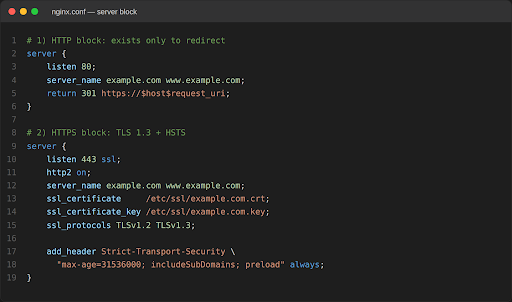
The includeSubDomains parameter applies the policy to all subdomains, and preload lets you submit the domain to the browsers’ preload list, which forces HTTPS even before the first request to the site. Because it’s difficult to reverse, this should only be done once regular audits confirm there are no pages, assets or subdomains still being served over HTTP.
- Run periodic audits: regularly check that all pages and assets are being served correctly over HTTPS and that there are no known vulnerabilities in your TLS configuration.
HTTP to HTTPS migration – Conclusion
HTTP to HTTPS migration might seem like a technical detail, but it makes all the difference — and in 2026 it also became a matter of deadline. Between April and October, Chrome starts warning about insecure sites by default, and by then it’s no longer worth putting off.
Following best practice and avoiding the most common mistakes is like swapping a flimsy door for a reinforced safe: total security, no surprises in the browser, and bonus points with Google too. Make this change stress-free with UniK SEO and make sure your site maintains — and strengthens — the trust of visitors and search engines alike.
What You Need to Know…
Will migrating from HTTP to HTTPS make me lose rankings?
It shouldn’t, if done correctly: with properly configured 301 redirects, updated internal links and no mixed content. It’s normal to see minor traffic and ranking fluctuations for 1 to 4 weeks while Google reprocesses the new URLs — that’s not a sign of a penalty.
Do I need to use Search Console’s “Change of Address” tool?
No. That tool is meant for domain changes. For an HTTP to HTTPS migration on the same domain, Google treats it as a natural continuation of the site — just verify the new HTTPS property in Search Console and submit the updated sitemap.
How long does it take Google to reindex pages on HTTPS?
Usually between a few days and a few weeks, depending on crawl frequency and the site’s crawl budget. You can track progress through the URL Inspection Tool and the coverage report in Search Console.
What is HSTS and when should I enable it?
It’s a security header that forces the browser to always access the site over HTTPS. It should only be enabled once you’ve confirmed that 100% of the domain and subdomains work correctly over HTTPS, because inclusion on browsers’ preload list is slow and difficult to reverse.
Sources
– Google Search Central Blog — “HTTPS as a ranking signal” (2014)
– Google Security Blog — “HTTPS by default” (Chrome HTTPS-First Mode rollout, October 2025)
– Google Search Central — Site moves and migrations
– Google Search Console Help — Change of Address tool
– MDN Web Docs — Strict-Transport-Security header
– HSTS Preload List (Chromium Project)
Note: the two code blocks shown (.htaccess and Nginx) are illustrative examples, generated for this document, and not screenshots of a real site — they should be adapted to your actual server configuration before use.