
Robots.txt optimisation is a crucial element of technical SEO that, unfortunately, is often overlooked by website administrators.
However, as an international SEO agency, UniK SEO knows that this small plain text file can make all the difference in how search engines crawl and index your website, as it directly affects your ranking in search results.
In this guide, we will explain what robots.txt is, how to create a well-structured file, how to block pages on Google, the differences between robots.txt and meta robots, and what tools you can use to validate your file. Shall we get started?
What is robots.txt and what is it for?
Robots.txt is a simple text file located at the root of your domain (example: www.exemplo.com/robots.txt) whose main function is to indicate to search engine crawlers which pages can and cannot be crawled.
Its main functions are:
- Manage the crawl budget: by preventing bots from accessing unnecessary pages, it ensures that search engines focus only on the most important pages;
- Protect private areas: it prevents administration pages or restricted content from being accessed by search bots;
- Preventing duplicate content indexing: it helps prevent repeated or irrelevant pages from appearing in search results.
Although robots.txt and SEO are directly related, the correct configuration of this file is essential to avoid accidental blocks that could harm the website’s organic traffic.
How to create an SEO-optimised robots.txt file
Creating a robots.txt file is simple and does not require programming knowledge. To do so, follow these steps:
Define the areas of the website that should not be visited by search engines
Before creating the file, identify the pages that should not be crawled, such as:
- Administration pages (/wp-admin/, /admin/, etc.);
- Private areas, such as shopping carts or checkout pages;
- Internal search pages that are not relevant to visitors.
Create the robots.txt file
Robots.txt must be a simple text file created with an editor such as Notepad (Windows) or TextEdit (Mac). In this file, you can indicate what search engines can and cannot visit.
Here is a basic example:
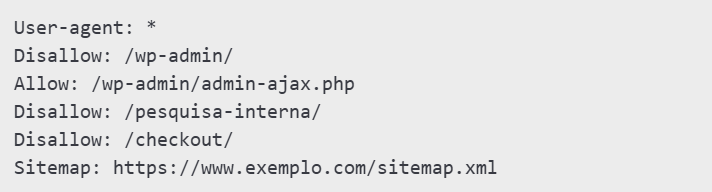
Explanation:
- User-agent: * – applies the rules to all search engines;
- Disallow: /wp-admin/ – blocks the administration folder;
- Allow: /wp-admin/admin-ajax.php – allows a specific file in the blocked folder;
- Sitemap: https://www.exemplo.com/sitemap.xml – indicates where the sitemap is located to facilitate indexing.
Use special characters for more advanced rules
- The asterisk (*) represents any sequence of characters;
- The dollar sign ($) indicates the end of a URL.
For example, to prevent PDF files from being analysed by search engines, you can add:

How to block specific pages with robots.txt
If you want to block pages on Google, follow these steps:
- Identify the pages that should not be visited, such as test or temporary pages;
- In the robots.txt file, add a line with “Disallow:” (without quotation marks), followed by a space and the path to the page;
- Test the changes to ensure they work correctly.
Here is an example of how to block a specific page:

Note: although blocking a page in robots.txt prevents it from being analysed by search engines, this does not prevent it from being indexed if it is already on Google.
To ensure that the page does not appear in the results, use the noindex meta tag in the page’s code.
Difference between robots.txt and meta robots
Robots.txt controls which pages can be visited by search engines, while meta robots control whether or not those pages should appear in search results.
If you want to prevent a page from being crawled, use robots.txt, and if you want to prevent it from being indexed, use the noindex meta tag. It’s that simple!
Tools to test and validate your robots.txt
After configuring your robots.txt file, you should test it to ensure it is working correctly. Some useful tools include:
1. Google Search Console
Allows you to verify that robots.txt rules are correctly interpreted by Google.
2. Screaming Frog SEO Spider Website Crawler
This SEO audit tool analyses robots.txt and identifies blocked or allowed pages.
3. Robots.txt Checker
This is an online tool that tests and validates the syntax of the robots.txt file.
Final word
Proper optimisation of robots.txt allows search engines to focus on the most important pages of your website, improving page indexing on Google.
If you need help setting up your robots.txt file correctly or a complete technical SEO strategy, UniK SEO is at your service to improve your website’s performance in search engine rankings. Contact us today!